FOR AUTHORS
What Should Authors Post on Social Media Between Releases?
What should authors post between releases? A balanced mix of story, process and reader posts, series reminders, countdowns and a weekly plan.

How to choose your Author Central photo, set up your Amazon Author Page and keep one consistent look across books, website and socials.
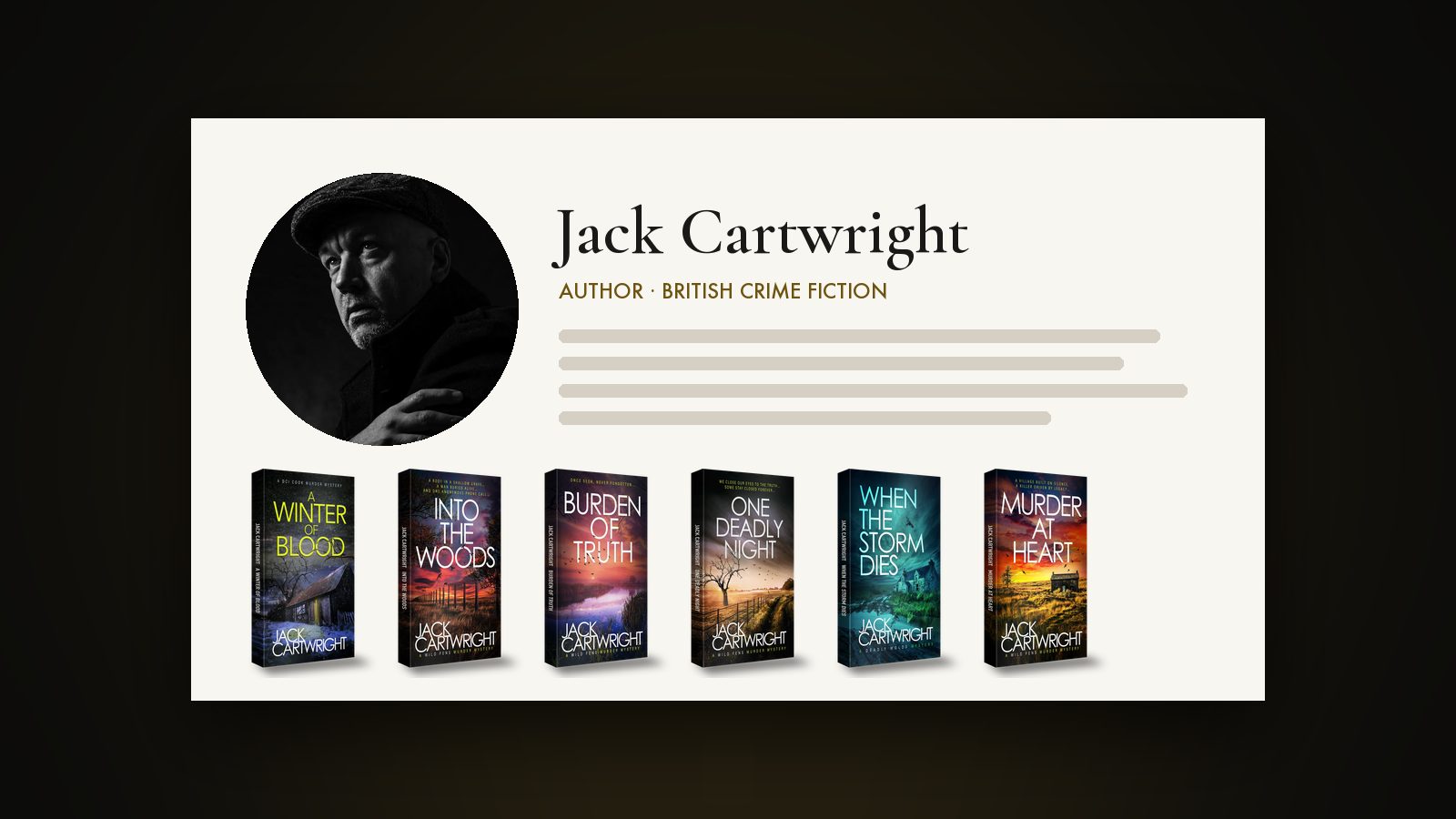
Your Author Central photo should be a well-lit head and shoulders portrait that looks like you now and suits your genre. Claim your Author Page in Author Central and add the photo with a short bio. Use the same image, or a close match, in your back matter and on your website, newsletter and social profiles so readers know you.
When a reader enjoys a sample or a blurb, one of the next things they might do is click your name. That takes them to your Amazon Author Page. There’s a short bio and a list of your books. And there’s your Author Central photo. It’s a small patch of ground. It’s also one of the very few spots on Amazon where you decide how readers see you.
This article covers what Amazon says Author Central does and how to pick and set up the photo. It also explains how to keep the rest of your presence consistent with it.
Author Central is Amazon’s tool for creating and managing an Author Page. Amazon’s KDP help is plain that a page does not come standard with KDP. To get one, you register for an Author Central account, and your book has to be published first. Amazon says the page displays bibliographies and biographies. Author profile photos go there too.
So the photo is part of your sales page in the broader sense. A warm, professional image tells readers who are browsing that a real person wrote the book, and the style of the shot is one more clue to the genre. A moody, low-key portrait fits a thriller. A bright, smiling one fits a cosy mystery or a romance.
On Amazon’s side, the steps are simple. According to the KDP help page for Author Central, you start from the KDP Marketing page and pick a marketplace. Then click Manage author page. Next, search for one of your books by ISBN, ASIN or author name and choose the option to join as your author name.
Once you’ve claimed the page, Amazon says you can:
Author Central is supported on Amazon.com, .co.uk, .de, .fr, .co.jp and .com.br. Amazon adds that in some other marketplaces, the information shown is pulled from the US marketplace and can’t currently be edited. Selling mostly to UK readers? Set up your page on the UK site as well as the US one, and check both.
Amazon changes the exact photo options and file requirements every so often. Before you prepare your image, check the upload screen inside Author Central for the current specification.
People mostly look at the page on their phones, and the photo appears small, so it has to work at a glance.
Crop in close. Go for head and shoulders, with your face filling a good part of the frame, because a full-length shot shrinks to a smudge at thumbnail size. Keep the background soft and plain, or gently blurred, so nothing fights with your face for attention.
Make sure it looks like you. Use a recent photo, one that a reader meeting you at an event would recognise. Upload a sharp, well-exposed original file, never a screenshot or a photo of a print. And match the photo to your genre. The colour and light should sit comfortably beside your covers. So should your expression.
If you’re commissioning new pictures, ask for a tight crop made specifically for this job as part of the set. With author photography, brief the photographer for profile and avatar crops as well as one big portrait.
The photo and the bio work together. Keep the bio short and in the third person for Amazon, and open with what your readers care about. Name the genre you write and your best-known series. Add one human detail. If you’re a USA Today bestseller, or your background lends weight to the genre, say so. Only do that if it’s true and you can stand behind it.
Author Central lets you add a biography in different languages, so think about a translation if you have readers abroad. Finish by telling people where to find you, such as your website or newsletter sign-up, if the format allows.
Being consistent doesn’t mean using one picture for ever. It means readers recognise you every time they come across you. Choose one main portrait and one or two supporting images, and use them on purpose.
| Where | What to use |
|---|---|
| Author Central profile | Primary head and shoulders portrait |
| Back matter in ebooks and paperbacks | Same portrait or a close match, with a short bio and a newsletter link |
| Website | Primary portrait on the about page, plus a wider, relaxed image for the header |
| Newsletter | Small portrait beside your sign-off, so emails feel like they come from a person |
| Facebook, Instagram, X and others | Tight crop of the same session, sized for a circular avatar |
Keep your name and its spelling the same everywhere. The same goes for your short bio wording. Readers notice when your author website says one thing and your Amazon page says another. A single folder of approved images and bios makes this easy to keep on top of, launch after launch.
Update it when your look changes, when you move into a new genre, or when the photo starts to look tired next to your newest covers. When you do, swap it out everywhere at once, including the back matter in your next upload. Older books in your catalogue will carry the old photo until you revise their files, so decide whether it’s worth refreshing at least the files for the first book in each series.
We started out as the in-house team of our founder, the USA Today bestselling author Jack Cartwright, so we know how author images have to work on Amazon and in books. Websites and social media too. We can help you plan and shoot author portraits for all of those places. For the bigger picture, see how we market self-published authors. Before any work begins, we agree a clear brief, scope and fee with you.
No. Amazon’s KDP help says an Author Page doesn’t come standard with KDP and that you need an Author Central account to have one. It’s optional. It’s also free to claim, and it gives readers somewhere to find out about you and see all your books in one place.
You can use a similar one, but a separate head and shoulders portrait usually works better. A cover photo is there to sell a story, and it often carries a title or a scene. Your author photo just needs to introduce you, and a clear portrait does that best.
Not having one is the real cost, because skipping marketing is a lost opportunity. Treat marketing as a cost and you cut yourself off from a vital arm of your business, then start to see it as a negative. Readers partly judge a book by the person behind it, so going without a polished, consistent photo costs you more. Agree a clear scope with your photographer, including crops for Amazon and permission to use the images in ads.
Either can work, as long as it suits your genre and you use it consistently. Black and white can look moody for crime and thrillers. Colour feels warmer for romance and cosy mysteries. Whichever you go for, check it still reads clearly when it’s small.
Amazon says Author Central is only supported on a limited set of marketplaces. In the others, the information shown is pulled from the US marketplace and can’t currently be edited. Check your page in each marketplace where you sell, and update the ones you’re able to.
What should authors post between releases? A balanced mix of story, process and reader posts, series reminders, countdowns and a weekly plan.
Learn how to give every book in a series a consistent look, with colour per book, clear numbering, box set covers and refreshes that help read-through.
Why indie authors sell ebooks, paperbacks and audiobooks from their own site, how delivery works, and what to check on VAT and KDP Select first.
Four quick questions, and we’ll show you where we’d start. Your answers come straight to us with your message, so you won’t have to explain it twice.
A 30-minute introduction call on Microsoft Teams, Monday to Friday, 9am to 5pm. Your answers come with the booking, so we’ll be ready for you.
Prefer to talk it through? Make an appointment for a 30-minute call on Microsoft Teams, Monday to Friday, 9am to 5pm.
A closer look at the work behind each part of your plan.
We use analytics cookies to understand how visitors use our site. They are only set if you accept. Read our privacy policy.