FOR PODCASTERS
How to promote a podcast on Instagram
How to promote a podcast on Instagram in the UK: Reels from every episode, Stories on release day, guest collabs, trial reels and posting between seasons.

A practical UK guide to video podcast lighting: key, fill and practical lights, two-person desks, backgrounds, flicker under 50 Hz mains and a look that stays consistent.
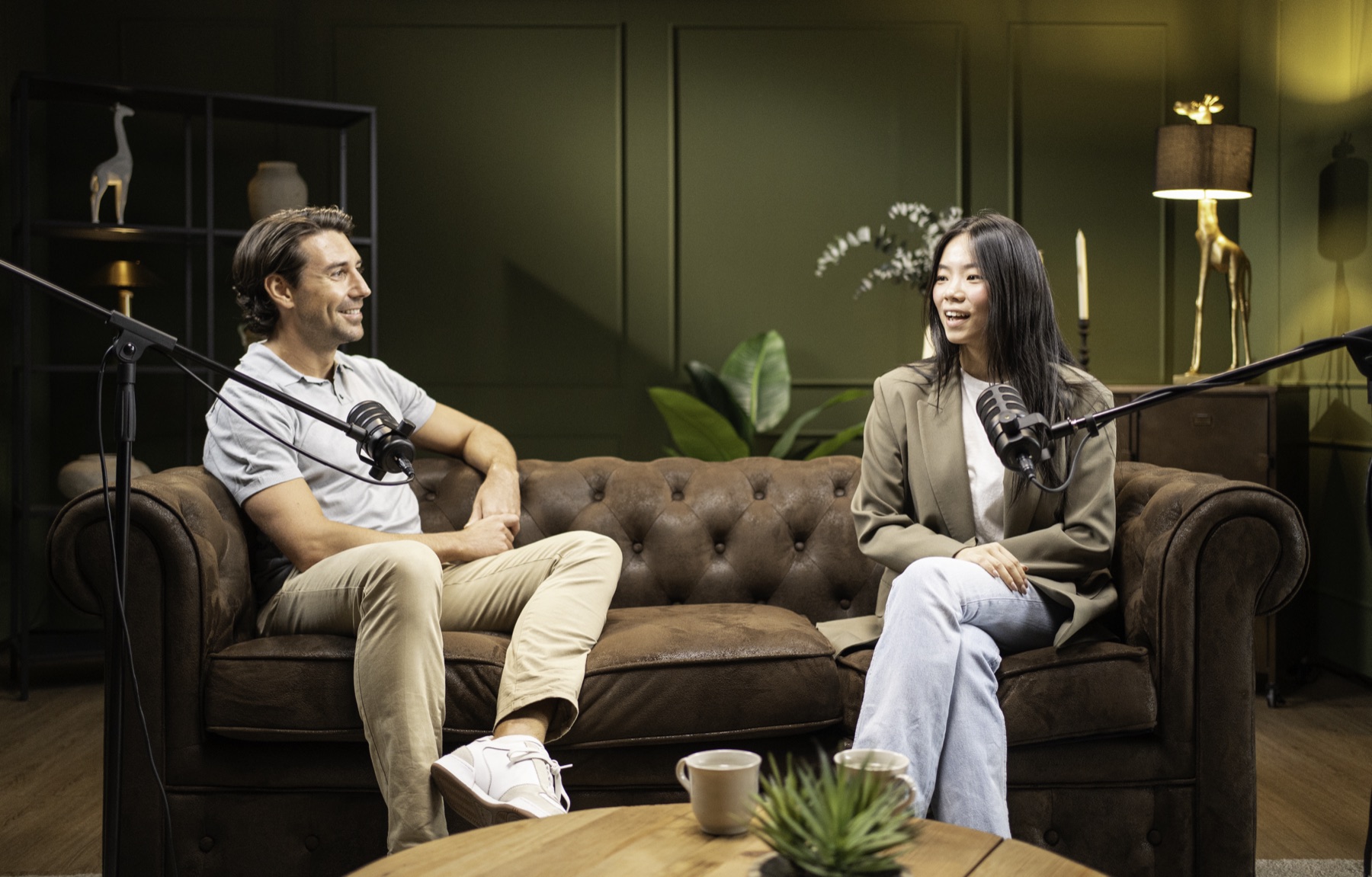
Video podcast lighting works best in three layers: a soft key light on each face, slightly to one side and just above eye level; a gentle fill or bounce so shadows stay soft; and practical lights in the background, such as lamps, a lit shelf or a red ON AIR sign, to give the set depth. Control daylight, keep every light the same colour, and set your cameras so lights don’t flicker under UK mains power.
Picture opening YouTube and seeing your show the way you always imagined it: warm faces against a darker room, a lamp glowing over one shoulder, the ON AIR sign a soft red point in the background. It looks like you, it looks like the show sounds, and anyone scrolling past can tell in a second that this is a programme, not a video call.
That feeling comes almost entirely from light. Cameras matter far less than people expect. This guide explains how to light a podcast set in a spare room, an office or a hired studio, so it looks considered every week without hours of fiddling.
A modest camera in good light will beat an expensive one in poor light every time. Light shapes faces, separates people from the background and sets the mood of the whole show. It also decides how much work the edit needs: a well-lit set needs little colour correction, while a badly lit one can take hours to rescue and still look flat.
Good lighting also helps your guests. People relax when they are lit flatteringly and are not squinting into a harsh lamp. If you are still planning cameras and sound, our guide on how to film a video podcast puts lighting in the right order alongside them.
| Light | Where it goes | What it does |
|---|---|---|
| Key | In front of each person, about 30 to 45 degrees to one side, slightly above eye level | The main light on the face; gives shape and catches the eyes |
| Fill | On the other side, weaker, or a white bounce board | Softens shadows without flattening the face |
| Back or rim | Behind and to the side, out of shot | A thin edge of light on hair and shoulders to lift people off the background |
| Practicals | In shot: lamps, shelf lights, signs | Depth, warmth and the look of your show |
Make the key light as large and soft as the room allows. A softbox, a large diffusion panel or light bounced off a white wall gives the gentle, flattering look most conversational shows want. A small, bare LED close to the face does the opposite.
Most podcast sets have two people facing each other with cameras on each. A reliable approach is to put each person’s key light on the side of their face that their close-up camera sees less of, so the side facing the lens falls slightly into shadow. This gives faces shape and looks natural on screen.
Watch for a few common problems:
The background should be darker than the faces but never black. Pull people a metre or two away from the wall if you can, so you can light the space behind them separately. Then build the mood with practicals: a table lamp with a warm bulb, a small light inside a bookshelf, an LED strip under a shelf, or a neon or ON AIR sign.
Coloured light can carry your brand, but use it sparingly. A soft wash of your show’s accent colour on the back wall says “this is us”; the same colour on someone’s face looks like a nightclub. Keep red for small details. If you are designing the set around your cover art and thumbnails, our graphic design for podcasters page explains how the visual pieces connect.
For most podcast sets, two or three bi-colour LED panels with softboxes, plus a few practical lamps, are enough. When choosing, look for:
Some mains-powered lights, especially cheaper LEDs and household bulbs, pulse in time with the electricity supply. Great Britain’s grid is kept at a frequency of 50 Hz. On camera, a mismatch shows up as rolling bands or a shimmer that is very hard to remove later.
The usual cure is to match the camera to the supply. Filming at 25 frames per second with a shutter speed of 1/50 second, a common UK set-up, normally avoids the problem. If you film at 50 frames per second, try 1/100. Always test each practical lamp on camera before a recording, and replace any bulb that still flickers.
Keep the frame rate consistent too. YouTube advises uploading at the same frame rate that was used during recording, and Spotify lists 24, 25, 30, 50 or 60 frames per second among its recommended specs.
Daylight is lovely and unreliable. Over an hour-long recording it changes brightness and colour, and a cloud passing can make one half of an episode look different from the other. Keep windows out of shot, cover them with blackout blinds or heavy curtains, or use them only as a soft, distant fill that your own lights can overpower.
If you must keep a window in, set your lights to a daylight colour temperature so everything matches, and record at the same time of day when you can.
A consistent set becomes part of the brand. Our page on marketing for podcasters shows how one well-lit recording can supply episodes, clips, photographs and artwork for weeks.
When you would rather hand the whole set over, our videography for podcasters includes planning camera positions, lighting and the look of the set around your space.
There is real pride in seeing your set on YouTube and recognising yourself in it. We began as co-founder Jack Cartwright’s in-house team, lighting, filming and designing everything around his books, and our videographer Callum now brings the same eye to podcast sets. With our videography for podcasters, we design the lighting around your room, film your episodes and leave you notes so the look repeats every week. A clear brief, scope and fee are agreed before any creative work begins.
For a two-person show, two soft key lights, one fill or bounce and a few practical lamps in the background are usually enough. Add a back light if people blend into the wall. A solo show can work with a single large, soft key light and one or two practicals, provided the room is otherwise controlled.
A ring light is fine for a single person talking straight to camera, but it gives a flat, even look and a distinctive circle in the eyes. For a conversation filmed from the side, a larger soft light placed off to one side usually looks more natural and gives faces more shape.
That is a creative choice, but the lights on faces should match each other. Many conversational shows choose warmer practical lamps in the background and a neutral or slightly warm key on faces, which feels relaxed and inviting. What matters most is consistency across lights and across episodes.
Usually because a light is pulsing with the 50 Hz mains supply while the camera’s shutter is out of step. Set the shutter to 1/50 second at 25 frames per second, or 1/100 at 50, and test every lamp on camera. Replace bulbs or LEDs that still flicker.
Not dark, but controlled. You need to decide where the light comes from, so blocking or diffusing windows and switching off overhead ceiling lights is usually the first step. A room with soft furnishings, a little depth behind the hosts and somewhere to place lamps is ideal.
How to promote a podcast on Instagram in the UK: Reels from every episode, Stories on release day, guest collabs, trial reels and posting between seasons.
How to write podcast show notes that persuade people to press play and help episodes get found in search, with a simple template, timestamps and transcripts.
Should your podcast be on YouTube? How it works, the three ways UK shows do it, what changes when you go video, earning money and when…
Four quick questions, and we’ll show you where we’d start. Your answers come straight to us with your message, so you won’t have to explain it twice.
A 30-minute introduction call on Microsoft Teams, Monday to Friday, 9am to 5pm. Your answers come with the booking, so we’ll be ready for you.
Prefer to talk it through? Make an appointment for a 30-minute call on Microsoft Teams, Monday to Friday, 9am to 5pm.
A closer look at the work behind each part of your plan.
We use analytics cookies to understand how visitors use our site. They are only set if you accept. Read our privacy policy.